Carton & Box Artwork Guide

After reviewing thousands of artwork files over the years, we've found that most production delays usually come down to a handful of recurring mistakes.
Common issues include important text or barcodes placed too close to the cut line, resulting in trimmed content; missing bleed areas that leave unwanted white edges after cutting; artwork supplied in RGB instead of CMYK, causing unexpected colour shifts during printing; low-resolution images that appear blurry or pixelated; and clear label designs submitted without a dedicated white ink layer, making the printed graphics appear transparent.
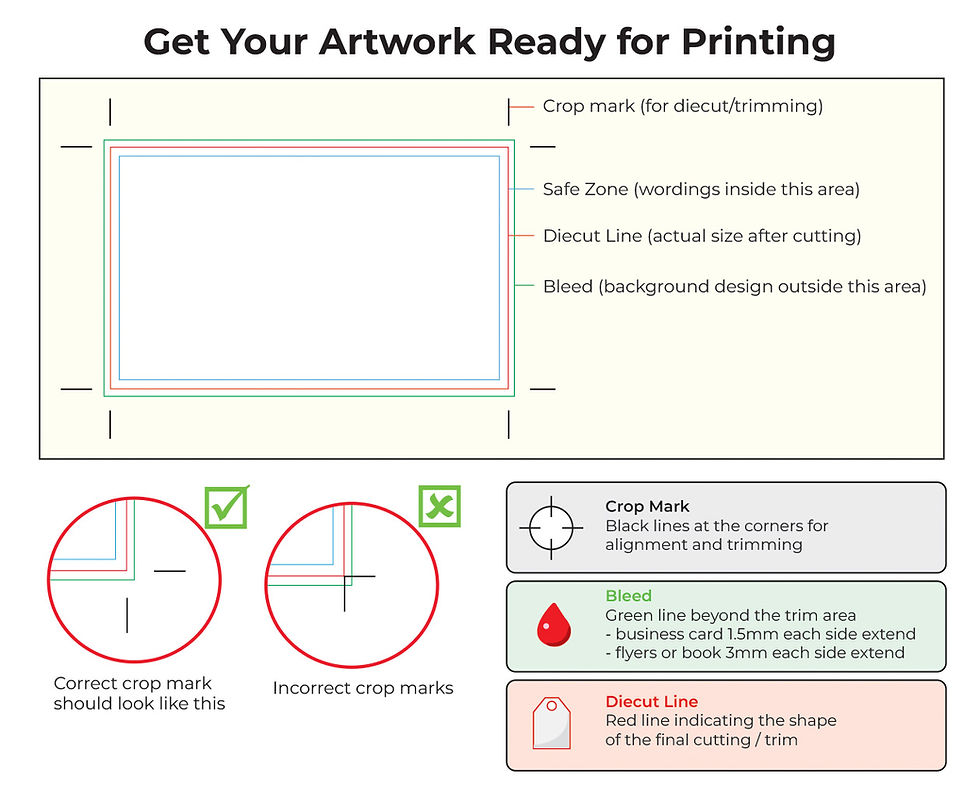
The good news is that these problems are easy to prevent once you understand the key areas of a print-ready file: the safe area, die line, bleed area, and any required white ink or varnish layers.
That's why we've condensed the essential artwork requirements into a single reference guide, covering safe margins, bleed allowances, barcode placement, print specifications, and material selection tips.



Comments